
Neo 2 DJI is further developing the Neo series. This series aims to combine a compact size with excellent image quality and a wide range of features. Read our review to find out how well it works.
We were already allowed to Power 1000 Testing. DJI has now given us the opportunity to present the first drone on our blog. Don't be fooled by its size; the small Neo packs a range of features that many larger aircraft can only dream of. We'll explain what that means in detail below.
tl; dr
Neo 2 supplies DJI This is a remarkably powerful compact drone that, despite its low weight of around 160 grams, offers an impressively wide range of functions. Aside from the good camera with its excellent image stabilization, the omnidirectional obstacle avoidance and the various automated flight modes, including tracking and gesture control, are also not to be underestimated.
Of course, the Neo 2 also has physical limitations. With ambitious use, the actual flight time is noticeably shorter than the manufacturer's specifications, and the sensors require careful handling during rapid changes of direction or when flying over very thin obstacles. Nevertheless, the overall package impresses with well-designed features, solid flight stability up to a maximum speed of 38 km/h, and strong image quality for this size class in sufficient light.
In summary, the Neo 2 is a versatile, small drone with excellent value for money. It is equally suitable for beginners in flying and for people who enjoy outdoor activities and want a compact cameraman with them.


Unboxing
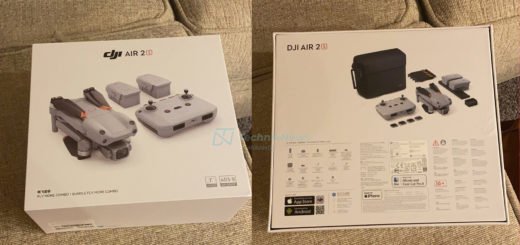
We received the Neo 2 in the Fly More Combo. This is also highly recommended for anyone buying a drone for the first time. Upon opening and unpacking the box, the electronic components, all in the same gray color, immediately catch the eye. These include the two-way charging station with three batteries, the RC-N3 remote control, and of course the drone itself, which already has the digital transceiver, gimbal protector, and propeller guards installed.
Useful little extras that are included are a substitute.proPeller set with two propellers and two screws each, a screwdriver, cables, instructions and stickers.


The drone
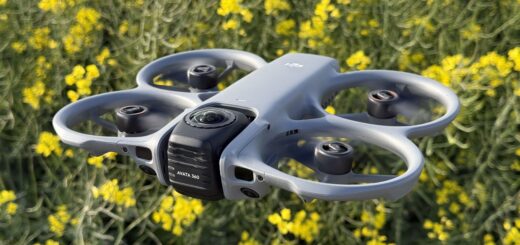
The Neo 2 weighs up to 160 grams and has minimalist dimensions of 16,7 × 17,1 × 5,4 cm (L×W×H, with propeller guards and digital receiver). Both are easy to remove and have advantages and disadvantages. With propeller guards, the drone is slightly slower due to increased susceptibility to wind. This is also the reason for the reduced battery life, as the motors have to move more weight and mass. However, this provides significantly enhanced propeller and gimbal protection, which doesn't make the drone indestructible, but does make flying considerably safer – especially indoors. The receiver also adds weight and mass, but ensures stable video transmission with low latency.


The flight
The Neo 2, like most other DJI drones, can be launched in several ways. It can either take off automatically at the push of a button, or the pilot can push both control sticks on the remote diagonally to the lower center. The flight speeds are distributed as follows:
| modus | Horizontal | Vertical |
| Cinema mode | 6 km/h | 1,8 km/h |
| Normal mode | 28,8 km/h | 10,8 km/h |
| Sports and Tracking Mode | 43 km/h | 18 km/h |
Landing is also extremely simple. Either the autopilot is assigned the task, which will then land, if desired, at the point of takeoff (not exactly, but with only a few centimeters of deviation depending on wind strength), or it will descend slowly to the ground from its current position. Alternatively, you can, of course, land by holding the control stick for an extended period.


Battery
The battery is located on the top, in the center of the drone. This results in a low center of gravity and allows for quick battery changes. DJI specifies a flight time of up to 19 minutes, or 17 minutes with the propeller guards attached. In reality, both of these figures are only achievable in calm conditions, without recording, and with stable flight behavior. If you're using the drone's full potential outdoors in terms of speed and video quality, you'll land after a maximum of 14 minutes.
Once the landing maneuver is successful, either manually or due to the drone's autopilot, the battery is simply removed from the drone and clipped into the charging station. It takes approximately 45 minutes to fully charge. Alternatively, it can also be charged directly via the drone's USB-C port. A really cool feature of the charging station is that it can not only supply power but also output it. This means it also functions as a power bank, capable of charging a mobile phone.

Camera modes
Of course, we have the option to film normally or to take photos at the touch of a button (both in 21:9 or 4:3).
| photo quality | video quality |
| 12 MP photo 4000 × 3000 (4∶3) 4000 × 2250 (16∶9) | Landscape format: 4K (4:3*): 3840 × 2880 at 60/50/30 fps 1080p (4:3*): 1440 × 1080 at 60/50/30 fps 4K (16:9): 3840 × 2160 at 100**/60/50/30 fps 1080p (16:9): 1920 × 1080 at 100**/60/50/30 fps Portrait format: 2,7K (9:16): 1512 × 2688 at 60/50/30 fps |
But then we have a whole toolbox of further image capture options. For this, however, the drone needs a specific subject (person or car) to be filmed. The modes "Dronie, Circle, Rocket, Dolly Zoom, Helix, and Boomerang" are probably the simplest.
Things get more exciting, for example, in "Follow" mode. Here, the camera tracks a target and follows it from the desired position. Thanks to the new omnidirectional obstacle detection, including LiDAR and infrared sensors, it's even possible to walk through the forest while the Neo confidently flies around trees. You just need to be careful if there are branches with a diameter of less than one centimeter in your path. These can sometimes be missed. The same applies, of course, to cycling, skiing, or driving a car for rolling shots. When driving a car, the pilot shouldn't change the camera angle during flight if there are trees nearby.
We encountered a situation where we wanted to move from the front to the back of a car. Unfortunately, the drone didn't fly straight over the car, but rather in a circle around it, and the sensors then had no chance of properly detecting the road. So the propeller guard had to prove its worth. And lo and behold, no damage whatsoever occurred when it collided with a tree. The sensors do have their limitations, but they work reliably as long as you don't push them too far. They should only be switched off indoors, otherwise the drone will be unable to move at all for fear of crashing into something.
Also of interest are the so-called SelfieShots. Here, up to six camera angles are selected in advance, and the drone then flies over them, taking a desired number of photos from each angle. To combine all these options, there's the MasterShot program. With this program, the drone performs most of the aforementioned shooting techniques in one continuous sequence.


Controller
Due to the restrictions imposed by European law (VLOS), it should be noted upfront that the Neo 2 easily meets these requirements. The next limiting factor is the battery, which gives out after a maximum flight distance of 4000 meters. The maximum transmission range is specified as 10.000 meters in the USA (due to higher permitted transmission power) and 6.000 meters in Europe. Shorter distances are always possible. In our test in a forest, the range ended after 800 meters. Incidentally, the small Neo 2 can fly vertically up to 120 meters high.
Remote Control
The RC-N3 is currently the entry-level model in the range of remote controllers offered. This basic model has everything you need – except for a display. Instead, your smartphone is clamped into an extendable holder. My iPhone 16 Pro Max fit easily without a case; with one, it's a tight fit. The live video quality, of course, depends on the smartphone itself. There's no need to worry about damaging your device. The RC-N3 holds everything securely on rubberized surfaces, which are also curved to prevent accidental presses of the phone's buttons. You can also choose whether the phone is charged or the power remains in the RC. Together with the DJI Fly app, this creates a fully functional remote controller.
The grips on the back are rubberized, as are the detachable joysticks and their recesses for secure storage. The joysticks themselves are made of metal with knurling at the thumb point. Please be sure to insert your phone first and then screw on the joysticks, otherwise you could scratch the back of your phone. Speakers are also built in, but a microphone is only available on the top-of-the-line DJI RC Pro 2 model.

Gesture and voice control
You don't really need gadgets like a smartphone and remote control anymore, do you? That's right, the Neo 2 can be controlled with sheer Jedi power – or at least that's how it feels. Using the three buttons on the side of the drone, you select the desired mode, control it via sound and a small display on the drone itself, and then launch it. Once the task is completed (which again requires a recognizable person or car), it returns. Not happy with its current position while filming? No problem: A forward-facing palm adjusts the altitude and angle. Moving two hands towards or away from each other adjusts the distance, and with one palm facing upwards, the drone lands itself. Apart from the slightly finicky distance adjustment, everything worked perfectly. As soon as one or two hands are detected, the drone gives you a corresponding flashing signal.
But the fun doesn't stop there. Just like Siri on iOS, you can activate the voice assistant on your phone with "Hey Fly." Predefined commands are then executed with varying degrees of reliability. In my opinion, it's a gimmick, but perhaps a backup plan should your fingers cramp up and you can no longer use your phone ;).


App
The app offers two control options. Firstly, via the app on your phone itself, and secondly, modes can be initiated via the Apple Watch, which then run automatically as long as the app is active on your phone. But controlling the drone is just the beginning.
The DJY Fly app offers much more than just video transmission and remote control. Tutorials on drone operation, legal regulations, and perfect image settings make it especially easy for beginners to get started. The interactive map is also a great help, displaying warnings for specific locations as well as good photo spots suggested by other users. Of course, you can also access the drone's internal 49 GB storage via the app and download images at speeds of up to 80 MB/s. The storage capacity is not expandable with an SD card or similar storage device. Finally, the app also provides information on any potential hazards during flight (weak signal, low battery, strong winds, etc.).


Price and availability
For the “Fly More Combo” we tested, the official DJI online store Currently priced at €399,00. In my opinion, this is a good price to get started with a solid set of basic drone equipment. As mentioned, the remote control isn't strictly necessary, although I highly recommend it for a more comfortable flying experience. Those who need to keep an eye on their budget can get the Neo 2 for €239,00, which includes a battery and propeller guards.
Many thanks to DJI Germany for providing the Neo 2 for testing. This did not influence our opinion!